DigiClock Widget3.0c
Publisher Description
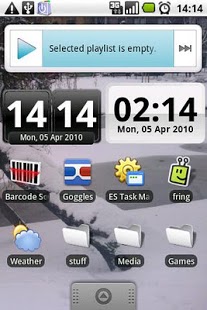
Themed Digital Clock widget.
Also check out my new game, Word Shuffle
Don't like 3.0? Email me with details why and i can provide a 2.6 build. Thanks!
Need help installing? Run DigiClock settings from your app drawer and check out help!
Other Problems? Help on dev site! Didn't help? EMAIL ME, i'll fix it!
IF STOPS UPDATING, CHECK IF A TASK MANAGER IS KILLING IT!
Cyanogen Mod may kill it aggressively. But shouldn't anymore ;)
USE: LONG PRESS HOMESCREEN, SELECT WIDGET
Please support dev by buying the Donate version!
About DigiClock Widget
The company that develops DigiClock Widget is David Goemans. The latest version released by its developer is 3.0c. This app was rated by 1 users of our site and has an average rating of 3.0.
To install DigiClock Widget on your Android device, just click the green Continue To App button above to start the installation process. The app is listed on our website since 2013-01-22 and was downloaded 35 times. We have already checked if the download link is safe, however for your own protection we recommend that you scan the downloaded app with your antivirus. Your antivirus may detect the DigiClock Widget as malware as malware if the download link to com.davidgoemans.simpleClockWidget is broken.
How to install DigiClock Widget on your Android device:
- Click on the Continue To App button on our website. This will redirect you to Google Play.
- Once the DigiClock Widget is shown in the Google Play listing of your Android device, you can start its download and installation. Tap on the Install button located below the search bar and to the right of the app icon.
- A pop-up window with the permissions required by DigiClock Widget will be shown. Click on Accept to continue the process.
- DigiClock Widget will be downloaded onto your device, displaying a progress. Once the download completes, the installation will start and you'll get a notification after the installation is finished.
Program Details
System requirements
Download information
Pricing
Version History
version 3.0c
posted on 2013-01-22
3.0c,Fixed widget for Android 1.5,Fixed bug with 24h mode on large widget,Changed update notification to be less annoying,3.0b:,Fixes crash caused by 3.0a fix,Adds 2 new fonts,3.0a:,Memory use bug fix,Fixed scaling on lower res devices,3.0,Setting 24/12 hour mode is in the Text Settings menu,When you add the widget, you can now choose a Large version,All themes now support custom fonts and transparency,New Fonts,Faster theme downloading,Prettier interface,News Screen
version 3.0c
posted on 2011-02-11
Several fixes and updates
